5.9 KiB
5.9 KiB
Anwendungen und Server
- ### Fritz-Box
- **Anwendung**: Router
- **URL**: [http://fritz.box/index.lua](http://fritz.box/index.lua)
- **IP**: 192.168.178.1
- **Ports**:
- **Hardware**: FRITZ!Box 7590
- **Server**:
- **Bemerkung**:
- Notfall-IP: http://169.254.1.1
- **DNS**: fritz.box
- **UNC**:
- **SSH**:
- ## Pi-hole
- **Anwendung**: AD-Blocker, DNS-Server
- **URL**: [http://pi.hole/admin](http://pi.hole/admin)
- **IP**: 192.168.178.78
- **Ports**:
- **Hardware**: NAS
- **Server**: Virtueller server **kbvpn**
- **Bemerkung**:
- [[Wireguard VPN & pihole]]
- für Update:
- Login auf kbvpn mit user chk
- ```
su pihole -up
```
- **DNS**: kbvpn
- **UNC**:
- **SSH**:
- **Notes**:
- [[Wireguard VPN & pihole]]
- ## Wireguard
- **Anwendung**: VPN-Server
- **URL**: vpn.straso.com (Host für Clients -> Server von außen)
- **IP**: 192.168.178.78
- **Ports**: 51820 (Fritz-Freigabe)
- **Hardware**: NAS
- **Server**: Virtueller server **kbvpn**
- **Bemerkung**:
- Ersetzt durch Wireguard-Server auf der Fritzbox
- **DNS**: kbvpn
- **UNC**:
- **SSH**: Port: 22, User: chk
- **Notes**:
- [[Wireguard VPN & pihole]]
- [[Neuen Wireguard-Server erstellen]]
- ## [[Synology NAS]]
- **Anwendung**: NAS, Host-Server
- **URL**: https://nas.kb/
https://kbnas.straso.com (deaktiviert)
- **IP**: 192.168.178.70
- **Ports**:
- **Hardware**: NAS
- **Server**:
- **Bemerkung**:
- Notfall IP: 10.0.4.1
- **DNS**: Kbnas
- **UNC**: file://192.168.178.70/
- **SSH**: Port: 2218, User: chk
- **Notes**:
- [[Zertifikat für externen Zugriff erneuern]]
- ## [[Home-Assistant]]
- **Anwendung**: Home-Automation
- **URL**:
- [https://kbha.straso.com](https://kbha.straso.com)
- [https://192.168.178.20:8123/](https://192.168.178.20:8123/)
- **IP**: 192.168.178.20
- **Ports**: 443, 8123
- **Hardware**: Pi4
- **Server**:
- **Bemerkung**:
- **DNS**:
- **UNC**: file://192.168.178.20/config
- **SSH**: Port: 22, User: root
- **Notes**:
- [[Zertifikat für Alexa HTTP-Integration erneuern]]
- Reverse Proxy Einstellungen NAS (nicht mehr gentzt)
collapsed:: true
- 
- 
- 
- ## Drucker
- **IP**: 192.168.178.69
- **URL**: [ET-4750 Series](http://192.168.178.69/PRESENTATION/HTML/TOP/INDEX.HTML)
- ## [[Paperless]]
- **IP**: 192.168.178.34
- **Port**: 8000
- **Server**: Docker Container
- **URL**: http://paper.kb:8000/
- Upgrade:
- altes Backup löschen, in /volume1/docker$
- ```
rm -r paperless_backup/
```
- Anwendung stoppen in /volume1/docker/paperless$
- ```
sudo docker-compose down
```
- neues Backup erstellen, in /volume1/docker$
- ```
cd..
sudo cp -r ./paperless ./paperless_backup
```
- Images löschen, in /volume1/docker/paperless$
- ```
cd paperless
sudo docker-compose rm -f
```
- Images Updaten, in /volume1/docker/paperless$
- ```
sudo docker-compose pull
```
- Anwendung starten
- ```
sudo docker-compose up -d
```
- Config NPM
- ```
proxy_http_version 1.1;
proxy_set_header Upgrade $http_upgrade;
proxy_set_header Connection "upgrade";
# proxy_set_header Host $host;
proxy_set_header X-Real-IP $remote_addr;
proxy_set_header X-Forwarded-For $proxy_add_x_forwarded_for;
proxy_set_header X-Forwarded-Host $server_name;
proxy_intercept_errors on; # the most important directive, make it on;
add_header P3P 'CP=""'; # may not be required in all setups
```
- ## Dashy
- **Anwendung**: Open Source Dashboard
- **URL**:
- https://dashy.kb/
- https://dashy.straso.com
- **IP**: 192.168.178.70
- **Ports**: 80
- **Hardware**: NAS
- ## NPM / NginxProxyManager
- **Anwendung**: NAS, Host-Server
- **URL**:
- Administration: http://192.168.178.35:81/
- **IP**: 192.168.178.35
- **Ports**:
- **Hardware**: NAS
-
Netzwerk
-
Dock-Host Zugriff in Docker-Netz ermöglichen #synology
- (254) Docker Host redet mit Container - YouTube
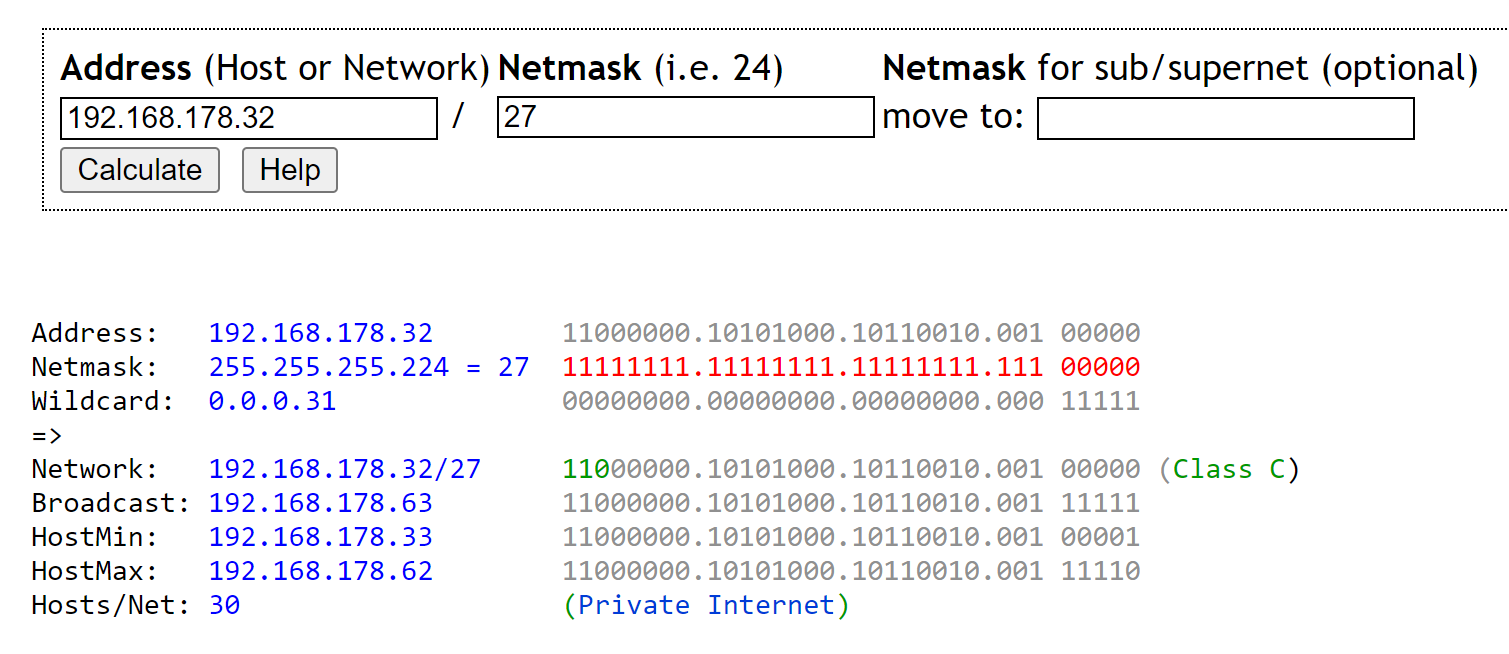
- IP Calculator / IP Subnetting (jodies.de)
 {:width 600}
- Subnetz-Mask 27 -> 30 Host möglich, 29 -> 6 Hosts möglich, 30 -> 2 Host möglich
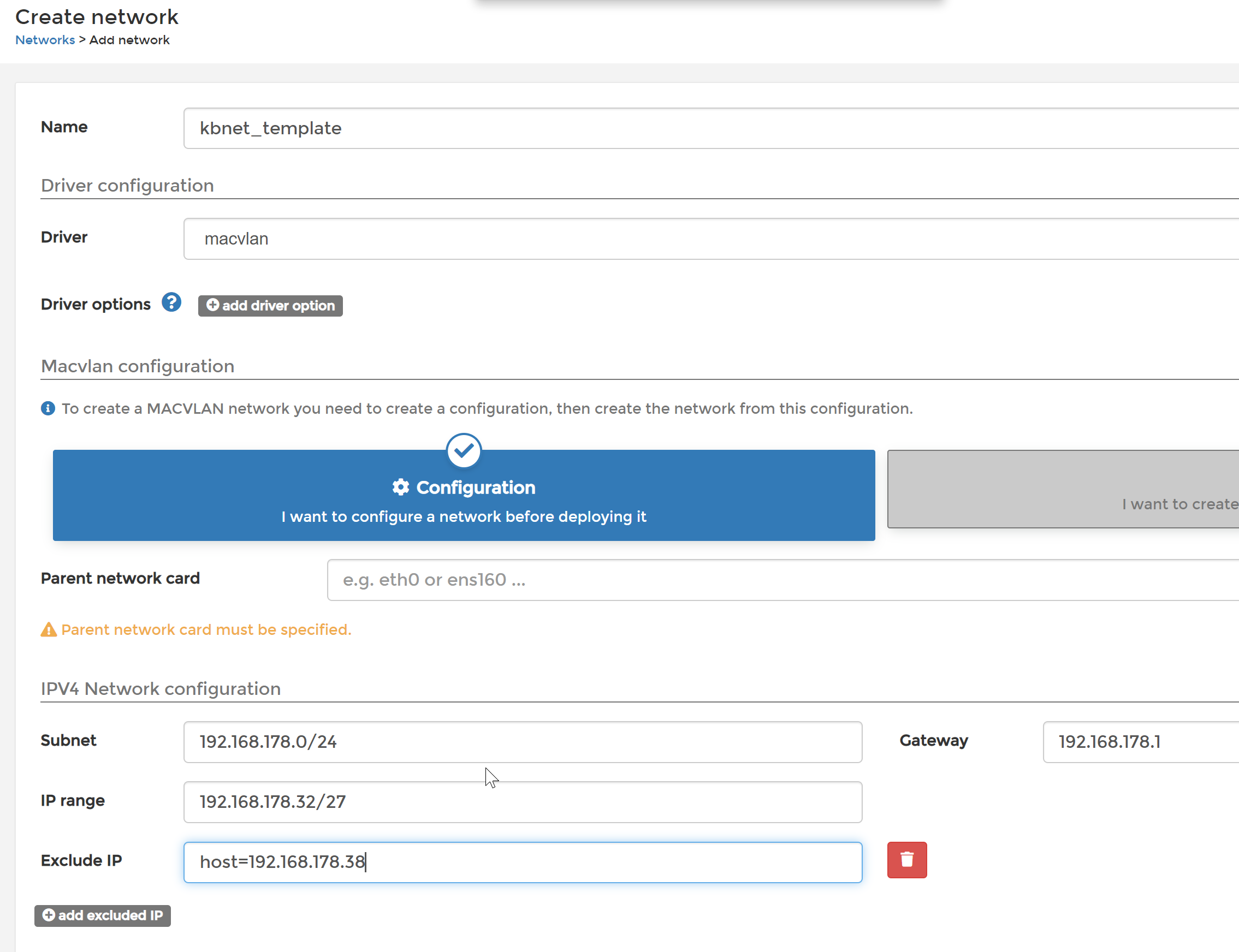
- 192.168.178.32 -> Netzwerk mit 30 Hosts für mac-vlan
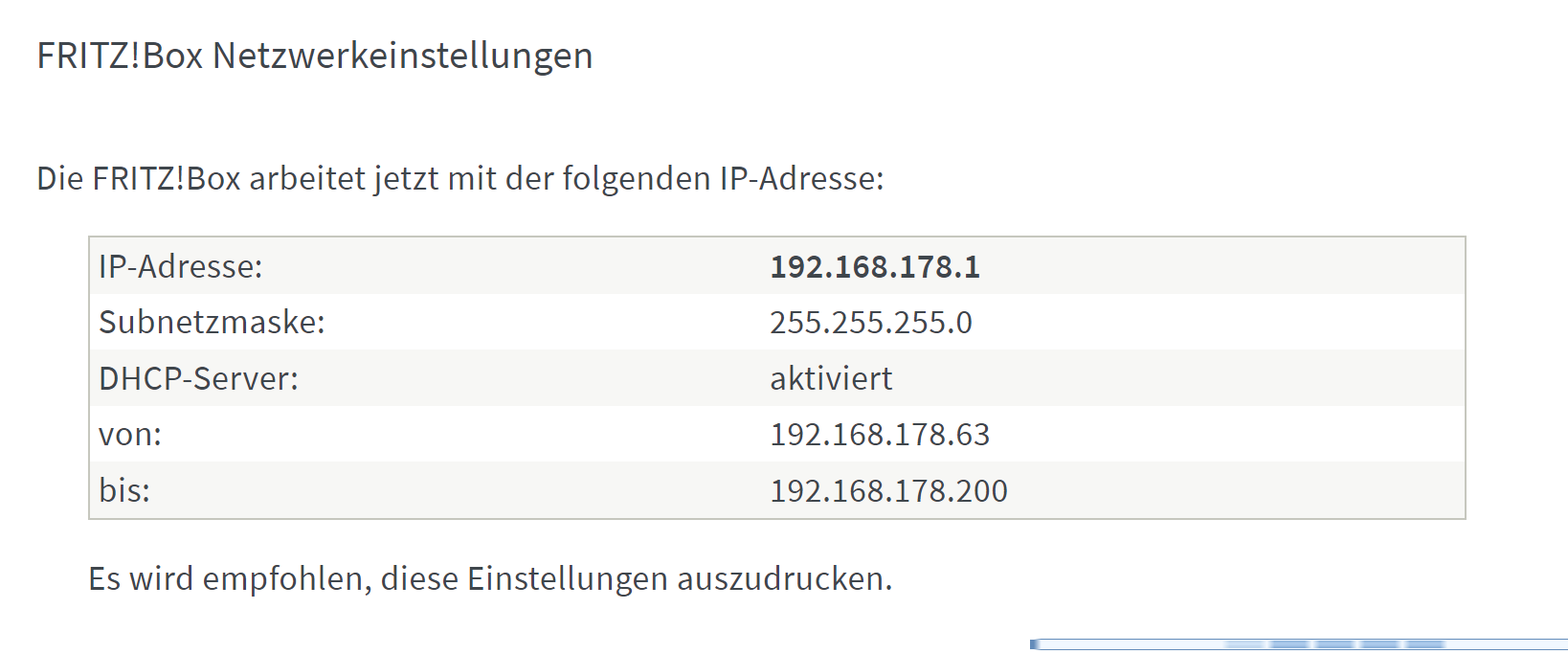
- 192.168.178.38 reservierte Adresse im 32er Netz, die einer virtuellen WLAN Karte auf dem Host zugeordnet wird
- DHCP-Bereich auf der Fritzbox beginnt somit erst hinter diesem Bereich, bei 63
 {:width 500}
-
Skript für Bridge-Adapter
-
#!/bin/bash
while ! /usr/local/bin/docker info >/dev/null 2>&1;
do
	sleep 5s
done

ip link add mvl-brg link ovs_eth0 type macvlan mode bridge
ip addr add 192.168.178.38/32 dev mvl-brg
ip link set mvl-brg up
ip route add 192.168.178.32/27 dev mvl-brg
-
-
macvlan Docker-Netzwerk
 {:width 500}
-
AnyType
-
Redis
- VPC erstellt: VPC Management Console (amazon.com)
-
Minio, auf Synology
-
-
statische IP-Adressen
- 192.168.178.33 - Dashy
- 192.168.178.34 - Paperless
- 192.168.178.35 - Nginx Proxy Manager, Nginx Proxy Manager
- 192.168.178.36 - homebox
- 192.168.178.38 - Bridge vom Host ins docker-Netz
- 192.168.178.39 - gitea
- 192.168.178.40 - minio
- 41 - mongodb
- 42 - twingate connector
-